|
|
| Line 1: |
Line 1: |
| [[Category:EiffelStudio]] | | [[Category:EiffelStudio]] |
|
| |
|
| ==Requirements== | | This page gives you an overview about how to get Eiffel Studio running on your Mac. |
| *'''Install X11, X11SDK and XCode''' from your OSX-Installation disk
| | |
| *'''Download''' [http://svn.macosforge.org/repository/macports/downloads/DarwinPorts-1.3.2/DarwinPorts-1.3.2.tar.bz2 DarwinPorts-1.3.2.tar.bz2] from macports.org
| | |
| **open a terminal (Programs->Utilities->Terminal) and type:
| | == Installation using MacPorts == |
| | |
| | MacPorts is a great tool that allows you to use many unix applications on the mac. We have created a package in the MacPorts repository that allows you to to install a fairly recent build with all dependencies in a convenient way: |
| | After installing MacPorts as described [http://trac.macosforge.org/projects/macports/wiki/InstallingMacPorts here] simply type |
| <pre> | | <pre> |
| cd your_download_directory
| | sudo port install eiffelstudio |
| tar xjvf DarwinPorts-1.3.2.tar.bz2
| |
| cd DarwinPorts-1.3.2
| |
| ./configure && make && sudo make install
| |
| export PATH=/opt/local/bin:$PATH
| |
| </pre> | | </pre> |
| | and you're ready to go (after a few hours compiling that is :)). |
|
| |
|
| *'''Install GTK2''' from macports by typing:
| |
| <pre>
| |
| sudo port install gtk2
| |
| </pre>
| |
|
| |
|
| == Getting EiffelStudio == | | == Installing our builds == |
| | Alternatively you can also use one of the binary packages we provide here: |
| ===PPC=== | | ===PPC=== |
| If you use a Mac, that '''does not have an Intel Processor''', you can download EiffelStudio here: | | If you use a Mac, that '''does not have an Intel Processor''', you can download EiffelStudio here: |
| Line 33: |
Line 30: |
|
| |
|
|
| |
|
| | == FAQ == |
| | Any more questions? |
|
| |
|
| ===Compiling Eiffel Studio using the Porter Package===
| |
| If you want to compile your own EiffelStudio, instead of using the packages, make sure, you have the environment variables set and the necessary software installed, as indicated below:
| |
|
| |
| ====Environment====
| |
| Eiffel Studio needs several environment variables in order to work properly. I suggest you put them into your .bashrc and .profile file in your home directory. (on my system .bashrc is a symlink to .profile)
| |
|
| |
| You need to define the following variables:
| |
|
| |
| <pre>
| |
|
| |
| # for Macports
| |
| export PATH=/opt/local/bin:$PATH
| |
| export MANPATH=$MANPATH:/opt/local/share/man
| |
| export INFOPATH=$INFOPATH:INFOPATH:/opt/local/share/info
| |
|
| |
| # For EiffelStudio
| |
| export ISE_PLATFORM=macosx-ppc # macosx-x86 on intel
| |
| export ISE_EIFFEL=<PATH TO YOUR Eiffel57 directory e.g. /Developer/Applications/Eiffel57>
| |
|
| |
| export PATH=$PATH:$ISE_EIFFEL/studio/spec/$ISE_PLATFORM/bin:$GOBO/bin
| |
|
| |
| # Optional
| |
| export GOBO=$ISE_EIFFEL/library/gobo # Only needed if you want to use gobo
| |
| export EIFFEL_SRC=<PATH TO YOUR EIFFEL SVN CHECKOUT, only needed if you want to compile ES yourself>
| |
| export ISE_LIBRARY=$ISE_EIFFEL # If this is not defined it defaults to ISE_EIFFEL
| |
| </pre>
| |
|
| |
| ====Software Requirements====
| |
| As above you need:
| |
| * X11, X11SDK, XCode. Install them from your Install Disk that came with your Mac. (You can get the latest [http://developer.apple.com/tools/ Xcode] and [http://www.apple.com/downloads/macosx/apple/x11formacosx.html X11] on the web.)
| |
| * [http://www.macports.org MacPorts] previously known as [http://darwinports.opendarwin.org/ Darwin Ports]
| |
| * GTK2 from MacPorts: Do a "sudo port install gtk2" , this will install gtk2 and all required dependencies
| |
|
| |
| ====Note====
| |
| NOTE: Since the C code generated by Eiffel Studio might not work properly if compiled with gcc 4, you might want to switch to GCC 3 by doing a "sudo gcc_select 3.3". However I've never encountered this problem with GCC4.
| |
|
| |
| ====Installation====
| |
| # Make sure that you have all requirements that are listed above and that you have set the ISE_PLATFORM environment variable to macosx-ppc or macosx-x86 depending on your platform.
| |
| # Download the latest Porter Package from [http://eiffelsoftware.origo.ethz.ch/downloads/builds/ here] (PorterPackage_57_XXXXX.tar)
| |
| # Extract the PorterPackage, double-clicking should work
| |
| # Open a Terminal window and cd into the PorterPackage directory
| |
| # Compile the Porter Package:<pre>./compile_exes $ISE_PLATFORM</pre> This will compile the complete EiffelStudio Package. This takes 1-2 hours depending on your machine.
| |
| # '''IMPORTANT''' : The installation now resides in PorterPackage/Eiffel57. In order to make it work you have to set execution permissions on the ec executable. <pre>chmod a+x Eiffel57/studio/spec/$ISE_PLATFORM/bin/ec</pre>
| |
| # Now you can move the Eiffel57 directory to any place you want. Just make sure to set the ISE_EIFFEL evironment variable accordingly.
| |
| # If you want the gobo tools you can compile them using this script, which will place them in the correct directory and clean up: [http://n.ethz.ch/student/roederja/download/gobo-script.sh gobo-script.sh]
| |
|
| |
| ====Running Eiffel Studio====
| |
| Enter "estudio" in a X-Term window. Make sure that your macports installation is the '''first''' item in your PATH environment variable.
| |
|
| |
|
| ==Hints== | | ==Hints== |
This page gives you an overview about how to get Eiffel Studio running on your Mac.
Installation using MacPorts
MacPorts is a great tool that allows you to use many unix applications on the mac. We have created a package in the MacPorts repository that allows you to to install a fairly recent build with all dependencies in a convenient way:
After installing MacPorts as described here simply type
sudo port install eiffelstudio
and you're ready to go (after a few hours compiling that is :)).
Installing our builds
Alternatively you can also use one of the binary packages we provide here:
PPC
If you use a Mac, that does not have an Intel Processor, you can download EiffelStudio here:
- or maybe you just want the Eiffel57 folder (19.10.2006 - Revision 64380)
Intel
If yor use a Mac that has an Intel processor, you can download EiffelStudio here:
EiffelStudio57.app (Revision 64493)
Or maybe you just want to get the Eiffel57 folder. (Revision 64493)
FAQ
Any more questions?
Hints
- Use Helvetica 12 as Editor font
- Pick and Drop works with Apple-key + mouse click
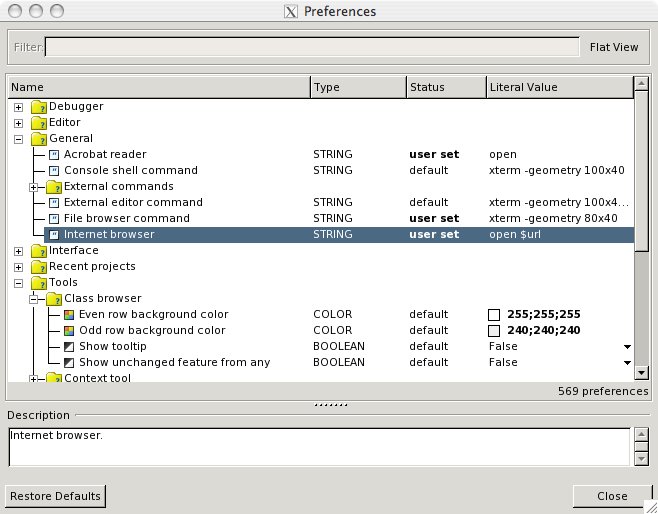
- To set up the correct (default) browsers use "open" as your command-line browser in Tools>Preferences...